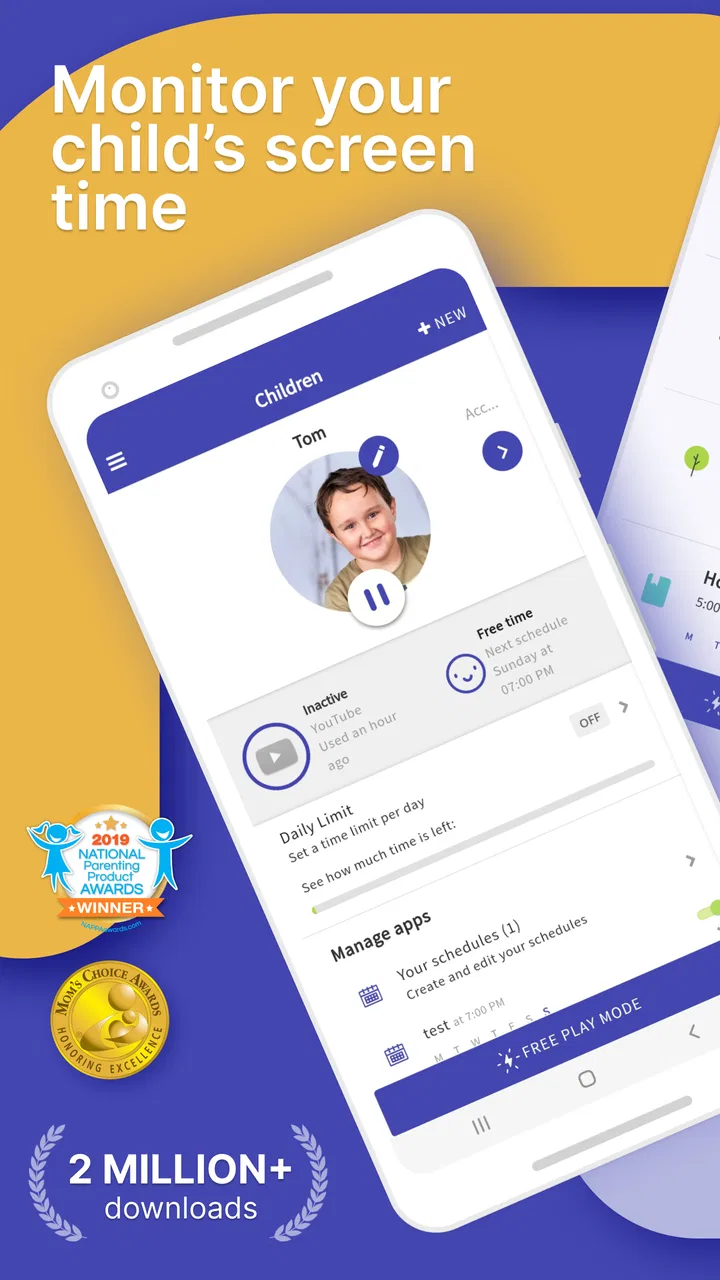
Screen Time - Parental Control
- 3.0
- Rating
- 1.00M
- Installs
- Free
- Price

 Analysis by App-foxy
When I look at parenting apps, I care less about how many controls appear on the screen and more about whether one useful control actually makes family life calmer. With Screen Time - Parental Control, the capability that matters most to me is the screen-time blocker. It turns a vague rule such as “put the phone away soon” into a limit that can be applied through the app, while location tracking and child lock add context around that central job.
I see this as a practical parenting app rather than a complete digital-safety solution. It is free to install, aimed at Everyone, and developed by Parental Control App by Screen Time Labs. The app has passed the million-install mark, which suggests that it has found a sizeable audience among parents who want more structure around a child’s device use. Its average rating is 3.1 from roughly forty-nine thousand ratings, so I would not approach it expecting a flawless experience. I would approach it as a tool that can be helpful when the family agrees on clear rules and the parent is willing to set them up carefully.
Making screen-time rules enforceable
The strongest idea here is simple: a parent should not have to negotiate the same bedtime or homework rule every evening. A blocker can take some of that repeated argument out of the routine. Instead of relying entirely on a child’s promise to stop, I can use the parent-side controls to make the agreed schedule more concrete. That does not replace conversation, but it changes the conversation from “you never listen” to “this is the limit we agreed on.”
You May Also Like

 Blood Strike: 2.5 Anniversary
Blood Strike’s Loadouts Turn Every Drop Into a Tactical Gamble
A close look at Blood Strike’s custom loadouts: how fast access to signature weapons reshapes its battle royale rhythm, rewards preparation, and narrows the gap between fights.

 Pandora - Music & Podcasts
Pandora’s Music Is Easy to Start, but Harder to Recover
Pandora’s strength is its low-effort path from a seed to a station. Its weak spot is how much confidence it asks you to place in connection, setup, and quiet recovery.

 8 Ball Pool
 Is Built on Rivalries, Rematches, and Routine
A close look at the rivalries, rematches, shared routines, and unanswered safety questions that turn a quick pool match into a persistent mobile community.

 Samsung Music
’s Quiet Strength Is Playing What You Already Own
Its reach comes less from spectacle than from dependable access to a personal library. That simplicity is both the app’s strongest retention engine and its ceiling.

 AccuWeather: Weather Radar
AccuWeather Review: A Quick, Clear Forecast for Everyday Decisions
For everyday plans, the best forecast is the one you can understand quickly. AccuWeather makes rain timing, radar, and local conditions easy to act on, with a few trade-offs.

 Hill Climb Racing
Why Hill Climb Racing Still Turns Crashes Into One More Run
A tiny car, a bumpy hill and one more upgrade: Hill Climb Racing keeps resurfacing because its simple chaos makes every near-miss feel personal.
More From Our News Desk



That distinction is important. A screen-time app cannot teach self-control by itself. It can, however, create a predictable boundary while a child is still learning how to manage games, videos, messaging, and browsing. In my view, the best result comes when the blocker is introduced as part of a family plan, not as a surprise punishment. I would explain what will happen, when it will happen, and which situations justify a parent-approved change before turning it on.
The app’s other headline functions support that same parenting workflow. Location tracking is useful when a parent needs reassurance about where a child is, while child lock is aimed at preventing unwanted use during a protected period. I would not treat those tools as substitutes for trust or direct contact. Their value is practical: they give a parent another way to keep a routine visible and manageable when the child is carrying a phone independently.
One detail I appreciate is that the app can be considered for several different ages without requiring the same rule for everyone. A younger child may need a firm evening cutoff, while an older child may respond better to scheduled limits and more independence. The app is not automatically “right” for either group; the quality of the result depends on how thoughtfully the parent matches the control to the child’s maturity.
What using the blocker feels like day to day
The real test is not finding the setting. It is what happens after the rule is active. A good setup should reduce the number of reminders a parent has to give, but it can also expose disagreements that were previously hidden. If a child believes a limit is unfair, the app will not solve that conflict. It may even make the conflict more visible because the device now enforces the boundary instead of merely displaying a warning.
I would begin with one clearly defined routine rather than trying to control every part of the phone. Bedtime is a sensible starting point because the rule is easy to explain and applies consistently. Homework can work too, although families should think about exceptions for school tasks. The most useful approach is to make the first rule predictable, observe how the child reacts, and then adjust the arrangement instead of adding several restrictions at once.
Parents should also remember that a blocker is only as reliable as the setup around it. If the parent frequently changes the rule in a moment of frustration, the child may learn that arguing is a way to extend access. I would reserve changes for genuine exceptions and explain them openly. That keeps the control from becoming an unpredictable contest between the adult and the device.
Another practical point is shared responsibility. The parent needs to know which device is being managed and which child the rule belongs to. In a household with siblings, applying one identical routine to everyone may be convenient but not necessarily fair. Different school schedules, ages, and responsibilities can make separate arrangements more sensible. The app is most useful when it supports those differences rather than being treated as a single household switch.
A realistic evening with Screen Time
Imagine a child who usually takes a phone to bed and continues watching short videos after saying goodnight. The parent has already discussed a cutoff and uses the app to block access at the agreed time. On the first evening, the child may still complain, ask for an exception, or insist that one more video is harmless. The app does not make that reaction disappear, but it stops the routine from depending on a tired parent repeating the same instruction.
The next morning, the parent can review the routine honestly: Was the cutoff too early? Was the child using the phone for something important? Did the rule protect sleep, or did it simply move the argument to another time? This is where I think the app works best. It creates a structure that the family can evaluate, rather than pretending that technology can make a parenting decision on its own.
Location tracking can add reassurance in a different part of the day. If a child is travelling between school, a friend’s home, and an activity, a parent may want a quick way to check their whereabouts rather than sending repeated messages. I would use that capability sparingly and discuss it with the child. Monitoring without explanation can damage trust, especially with older children who are beginning to expect more privacy.
Child lock is most compelling when the phone needs to remain available but should not be casually used. For example, a child might need to carry the device for contact while attending an activity, yet not spend the whole period playing with it. That is a more nuanced situation than simply taking the phone away. Still, parents should test the arrangement in their own routine and make sure the child understands how to reach them when necessary.
Where the app makes the biggest difference
The best scenario is a family dealing with repeated, low-level screen-time arguments rather than a serious safety emergency. If the same bedtime dispute happens every night, a consistent blocker can remove some emotional pressure from both sides. It gives the parent a repeatable rule and gives the child a clear expectation. That is a modest benefit, but in a busy household, modest improvements repeated every day can matter a lot.
I also think it suits parents who want one place for basic supervision instead of combining several unrelated tools. The combination of a screen-time blocker, location tracking, and child lock gives the app a broader role than a simple timer. The advantage is convenience: parents can think about device use, availability, and whereabouts as parts of one routine. The disadvantage is that a broader tool can feel less focused than a specialist solution built around one narrow task.
For a younger child who is learning boundaries, firm scheduling may be easier to understand than a complicated collection of reports. For a family with an older child, the same controls should be introduced with more discussion. I would frame them as temporary support for a shared agreement, with the possibility of loosening the rules when the child consistently manages time well. That makes the app part of a gradual move toward independence rather than a permanent surveillance system.
It can also help in households where parents work different hours. One adult may handle bedtime while another handles morning routines, and a consistent rule can prevent the child from receiving completely different answers depending on who is present. The app does not resolve disagreements between parents, of course. It simply makes it more obvious that the adults need to agree on the routine before expecting the child to follow it.
The tradeoffs behind automated limits
The main tradeoff is control versus cooperation. A blocker is effective precisely because it can stop access, but that firmness can feel heavy-handed if the rule is poorly chosen. A child who is finishing schoolwork, waiting for an important message, or dealing with an unusual family event may need flexibility. I would never set a rigid routine and then assume every exception means the child is testing the boundary.
There is also a trust tradeoff with location tracking. Some parents will find it reassuring, particularly when a child is travelling alone. Others may feel that constant checking creates anxiety or undermines growing independence. My advice is to define the purpose before using it: safety during a journey is easier to justify than checking a child’s position simply because the parent is curious. The conversation around the feature matters as much as the feature itself.
Parents should be realistic about the app’s rating. A 3.1 average from about forty-nine thousand ratings tells me that experiences are mixed. I would therefore install it with patience, test the chosen routine, and avoid making it the only thing standing between a child and a family rule. If the app behaves differently from what the household expects, the parent still needs a backup plan based on communication and ordinary device settings.
The pricing model is another consideration. The app is free, but in-app purchases range from about two dollars to fifty dollars per item. That means I would check the purchase details carefully before building a long-term family system around features that may require payment. The free starting point is useful for evaluating whether the approach fits the household, while the range of optional purchases means parents should decide what they genuinely need instead of unlocking controls impulsively during a stressful evening.
Compatibility is worth checking before installation as well. The current version is 3.11.71 and the app requires Android 7.0 or later. For a parent using an older phone, that requirement may be the first practical barrier. I would also make sure the child’s device and the parent’s device can participate in the intended setup before promising the child that a particular routine will work.
How it compares with simpler alternatives
Android’s built-in digital wellbeing tools or Apple’s native family controls may be a better choice for parents who only want basic time limits and prefer settings that are already part of the operating system. Those options can feel less demanding because there is no separate parenting service to learn. If all I need is a straightforward bedtime limit on one platform, I would seriously consider starting there.
Screen Time becomes more interesting when the parent wants the screen-time rule alongside location tracking and child lock. A single parenting app can be easier to remember than several separate settings, especially for families managing more than one child. The tradeoff is that a third-party tool may introduce more setup, more account decisions, and more dependence on the app’s own reliability than a built-in control.
Dedicated location-sharing apps are likely to be more appropriate for a family whose main concern is travel safety rather than screen use. Likewise, a specialist content-filtering product may be preferable when the priority is web filtering or detailed activity supervision. I would choose this app when the central problem is excessive or poorly timed device use, with location and locking serving as supporting features—not when I need a complete internet-safety platform.
That distinction helps avoid disappointment. The app is not automatically the best answer because it offers several tools. Its value depends on whether those tools match the family’s actual problem. If the household already has a working bedtime routine and only wants location sharing, another option may be simpler. If the household is stuck in daily screen negotiations, the blocker is the reason to consider this one.
Who is likely to benefit most
I would recommend it most to parents who want a visible, repeatable screen-time boundary and are prepared to explain that boundary. It is particularly suitable for families moving from informal reminders to a more consistent routine, or for parents who need a basic combination of device limits and location awareness. The free entry point makes it reasonable to try before deciding whether the wider feature set belongs in the household.
I would be more cautious for parents who want completely passive monitoring, perfect enforcement, or a solution that children will accept without discussion. The app cannot replace a family agreement, and its mixed rating suggests that some users may encounter friction. Parents of older teenagers should also think carefully about privacy and consent. A negotiated arrangement may work better than imposing every available control at once.
My most useful setup tip is to start with the single capability that prompted the download. If bedtime is the issue, begin there. Once the routine is stable, consider whether child lock or location tracking solves a separate, clearly defined problem. This staged approach makes it easier to tell which feature is helping and prevents the child from feeling that the phone has suddenly become subject to unlimited supervision.
Another tip is to create an exception policy before the first block occurs. Decide what counts as a genuine exception, who can approve it, and how the child should ask. This prevents the parent from making rushed decisions and prevents the child from treating every request as a negotiation from zero. It also turns the app into a teaching tool: the child learns that limits are firm, but responsible communication still matters.
After using it, I see Screen Time - Parental Control as a useful routine-building app with one clear strength: it can make screen-time boundaries more consistent. Its supporting tools broaden its usefulness, but they also bring more questions about privacy, flexibility, setup, and value. I would choose it when repeated device-use arguments are the main issue and when the family is willing to pair automation with honest conversation.
For that kind of household, the app can remove a little friction from everyday parenting without pretending to solve every digital-life problem. For families seeking advanced content filtering, highly detailed supervision, or location sharing alone, a different tool may be a better fit. My final view is cautiously positive: try the free version, begin with one carefully explained rule, and judge it by whether the home routine becomes calmer—not simply by how many controls are available.
FAQs for Screen Time - Parental Control
01What features does Screen Time - Parental Control offer?
Screen Time - Parental Control provides a comprehensive suite of tools for managing your child's device usage. Features include setting daily time limits, blocking specific apps, monitoring app activity, and scheduling device-free times. It also offers real-time location tracking and the ability to set tasks or chores that can earn extra screen time.
02Is Screen Time - Parental Control compatible with both Android and iOS devices?
Yes, Screen Time - Parental Control is available for both Android and iOS platforms. It allows for cross-platform monitoring, meaning you can manage an Android device from an iOS device and vice versa, offering flexibility for families using different operating systems.
03How does Screen Time ensure the privacy and security of user data?
Screen Time - Parental Control takes privacy seriously by implementing robust security measures. User data is encrypted and stored securely. The app complies with data protection regulations to ensure that your personal information and your child’s usage data are safe from unauthorized access.
04Can Screen Time - Parental Control be bypassed by tech-savvy kids?
While no system is completely foolproof, Screen Time - Parental Control is designed with multiple layers of security to prevent bypassing. Regular updates are provided to address potential vulnerabilities. However, it’s important for parents to stay engaged and discuss usage expectations with their children.
05Is there a cost associated with Screen Time - Parental Control?
Screen Time - Parental Control offers both free and premium versions. The free version includes basic monitoring and control features, while the premium version provides advanced options such as detailed reporting, multiple device management, and additional customization options. Subscription fees apply for the premium features.
Pros
- Comprehensive app usage reports.
- Customizable screen time limits.
- Supports multiple devices.
- Blocks inappropriate content.
- Real-time location tracking.
Cons
- Limited features in free version.
- Complex setup for beginners.
- GPS drains battery quickly.
- Some apps bypass controls.
- Notifications can be delayed.

Screen Time - Parental Control
Gallery